Finding the right AI productivity tools in 2026 is harder than it should be. There are hundreds of options, most of them overhyped.
We’ve been testing AI productivity tools for months at Filently — not just researching them, actually using them in our daily workflow. Some were genuinely life-changing. Others were noise.
This guide covers the tools that actually made a difference across five areas:
- Document organization — stop wasting time finding files
- Writing and translation — faster drafts, better copy
- Research — reliable answers without the rabbit holes
- Workflow automation — connect your apps, kill the repetitive tasks
- Design — professional visuals without a designer
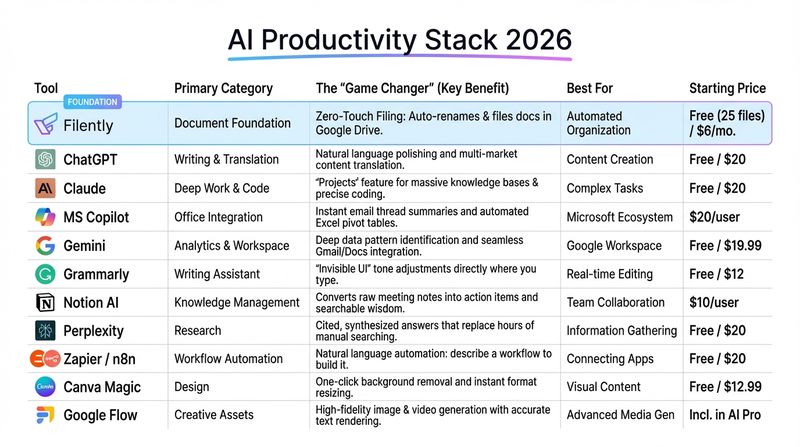
Here are the 11 best AI productivity tools that actually work in 2026.
1. Filently: Recommended AI Tool for Document Organization
I’ll be upfront: this is our product, so obviously I’m biased. But here’s why Filently comes first on this list, and it’s not just because we built it.
Every other AI productivity tool assumes you can find your files. ChatGPT can write brilliant emails for you, but only if you can locate the brief you need to reference. Notion AI can organize your knowledge, but only if your documents aren’t a chaotic mess in the first place. If you want to see what that chaos actually costs, our post on the real cost of Google Drive chaos breaks it down.
Document organization is the foundation. If this isn’t solved, everything else falls apart. Our guide to an AI document management system explains exactly how this layer works.
Filently solves it with zero-touch AI. You drop documents into Google Drive, and they’re automatically renamed (2026-03-01 - ClientName - Invoice - €450.pdf), categorized, and filed into the right folder structure. No rules to configure, no manual work.
The AI learns from your corrections. If you move a file or rename it, Filently adapts. We’re seeing 90%+ accuracy on extracting dates, company names, amounts, and document types. Our users report saving 3-5 hours per week on admin work.
The privacy piece matters too. Everything processes in encrypted memory, files stay in your Google Drive, and you can cancel anytime without losing your organized structure. No vendor lock-in, no data hostage situations.
Pricing: Your first 25 documents are free, no credit card required. After that: Personal plan at $9/month (25 docs/month), Professional at $29/month (250 docs/month), or Teams at $79/month (1,000 docs for 3 users). Launch Special: Annual billing gets you 4 months free in your first year.
Real talk: If you’re drowning in digital paperwork, start here. You can try every other tool on this list, but if you can’t find your files, none of them will help.
2. ChatGPT: Best AI Tool for Writing and Translation
ChatGPT was the one that started it all. For a long time, it was the default AI tool everyone used for everything. But here’s the honest truth in 2026: it’s been surpassed in most areas.
Where ChatGPT still wins: Language work. I use it for:
- Translating content between German and English (we operate in both markets)
- Polishing marketing copy and making it sound natural
- Brainstorming headlines and social media captions
- Quick rewrites and tone adjustments
The Custom GPTs feature remains useful. I have one trained on Filently’s documentation that answers support questions, and another for marketing copy in our brand voice.
Where it’s fallen behind: Pretty much everything else. For analytical work, Gemini is better. For code and deep thinking, Claude is better. For research, NotebookLM is better. ChatGPT used to be the Swiss Army knife. Now it’s a specialist tool for language tasks.
Worth noting: The free tier hits limits fast compared to Gemini or Claude. If you’re a heavy user, you’ll run into the cap quickly. The Plus subscription ($20/month) removes limits, but at that point, you might want to consider which AI you actually need most.
Bottom line: ChatGPT isn’t bad. It’s just no longer the best at most things. It was the pioneer, and it’s still excellent for language work. But the AI landscape has moved on.
Pricing: Free tier (limited). Plus: $20/month for unlimited access and better models.
3. Claude: Best AI Tool for Deep Work and Code
Full disclosure: I’m using Claude to help edit this very blog post. There’s something poetic about that.
Claude (from Anthropic) has quietly become the best general-purpose AI in 2026. What started as “the more thoughtful alternative to ChatGPT” is now genuinely better for most serious work.
Where Claude excels:
Code: When Valentin and I work on Filently features and I need to understand or debug something, Claude is noticeably better than ChatGPT. More careful, catches edge cases, explains complex logic clearly.
Deep editing: Claude is exceptional at refining content. It catches tone inconsistencies, spots where arguments get weak, and suggests improvements that feel thoughtful rather than surface-level.
Projects (formerly Skills): This is the secret weapon. Claude’s Projects feature lets you upload entire knowledge bases. I have a Filently Project with all our docs, brand guidelines, and product specs. Claude references them automatically in every conversation. It’s like having an AI that actually knows your business.
The 200K token context window means I can upload entire codebases, competitor analyses, and documentation, then ask Claude to identify gaps across all of them. It actually reads everything.
The Artifacts feature is brilliant for iteration. When Claude generates code or documents, they appear in an editable panel. You can refine and iterate without copy-pasting.
Honest take: ChatGPT is faster for quick language tasks. Gemini is better for pure data analysis. But for everything else, Code, strategy, editing, research, Claude is the best all-rounder in 2026.
Pricing: Free tier is generous. Pro at $20/month (same as ChatGPT Plus).
4. Microsoft Copilot: If You Live in Office
I’ll admit, I was skeptical. Another Microsoft AI feature that would probably be half-baked and forgotten in 6 months?
Turns out, Copilot in Microsoft 365 is legitimately useful if your work revolves around Word, Excel, Outlook, and Teams. The key word is “if.”
What makes Copilot different from ChatGPT or Claude is that it’s inside your workflow, not a separate tab. You’re already in Outlook? Ask Copilot to summarize that 47-email thread so you can prep for the meeting in 2 minutes instead of 20. Already in Excel? Tell it “create a pivot table showing sales by region and quarter” in plain English.
The Teams recap feature has saved me multiple times. Miss a meeting? Copilot generates a summary with decisions made, action items, and who’s responsible for what. It’s not perfect, but it’s 80% accurate, which beats trying to piece together what happened from Slack messages.
The catch: You need a Microsoft 365 subscription, and Copilot is an additional $30/user/month. That pricing hurts for small teams.
Bottom line: If Microsoft is already your stack, Copilot is worth it. If you’re on Google Workspace or Notion, skip this.
Pricing: Copilot Pro: $20/month (consumer). Copilot for Microsoft 365: $30/user/month (requires M365 subscription).
5. Gemini: Google’s Underrated Powerhouse
Gemini is Google’s AI, and it’s seriously underrated. While everyone was focused on ChatGPT, Google quietly built something excellent.
Why Gemini deserves more attention:
Better free tier: Gemini’s free version is significantly more generous than ChatGPT’s. You can do a lot more before hitting limits, which matters if you’re testing or using AI casually.
Analytical strength: Ask Gemini to analyze trends in a spreadsheet, identify patterns in data, or work through a logic problem. It thinks more carefully about numbers and relationships than ChatGPT does. I’ve been genuinely impressed by how it handles complex analytical tasks.
Gems: Google’s version of Custom GPTs, but better integrated. I have Gems set up for different workflows. They remember context and instructions better than I expected.
Google Workspace integration: If you live in Gmail, Docs, and Sheets, Gemini just works. The standout moment for me was asking it to “draft a response to this email referencing our conversation from last Tuesday and attach the pricing doc we discussed.” It found the thread, pulled context, and attached the file. Seamless.
Honest comparison: For pure language polish, ChatGPT edges ahead. For deep code work, Claude wins. But for analytical thinking, data work, and Google Workspace users, Gemini is the best choice.
The fact that it’s less hyped than ChatGPT actually works in its favor. Lower expectations, better reality.
Pricing: Free tier is generous. Google One AI Premium at $19.99/month for unlimited access.
6. Grammarly: Beyond Spell-Check
I’ve used Grammarly for years, long before the AI features. It started as a spell-checker that actually understood context. Now it’s an AI writing assistant that lives everywhere I type.
What I appreciate about Grammarly is how invisible it is. There’s no separate app to open, no context switching. It just works in Gmail, Slack, Notion, LinkedIn, anywhere with a text box.
The AI rewrite suggestions have gotten scarily good. I can type a messy first draft, select “make this more professional,” and Grammarly turns my rambling into something I’d actually send to a client. The tone adjustment is subtle but effective.
One minor frustration: The free version is useful, but the Premium version ($12/month) is where the real AI features live. If you’re writing important emails or content daily, it’s worth it. If you’re just fixing typos, the free tier is fine.
Pricing: Free tier for basics. Premium: $12/month. Business: $15/user/month.
7. Notion AI: Your Second Brain Gets Smarter
Our team has been using Notion for 2 years to organize everything: meeting notes, project plans, product roadmap, blog ideas. Adding Notion AI felt like giving our second brain the ability to think.
The meeting notes game-changer: This is where Notion AI really shines for us. After every team meeting, I drop the recording or notes into Notion, and the AI:
- Extracts action items with owners
- Summarizes key decisions
- Identifies blockers and next steps
- Makes everything searchable
No more “what did we decide about pricing?” moments. Just ask Notion AI to search across all meeting notes.
The workspace search is the other killer feature. Instead of scrolling through 50 pages of notes to find “that thing we discussed,” I can ask “what did we decide about lifetime deals?” and it surfaces the exact notes with context.
The AI writing features are solid too. Summarizing long documents, expanding bullet points into paragraphs, brainstorming ideas. But the real value is making your existing knowledge searchable and connected.
Worth mentioning: Notion AI only works if you’re already using Notion. If you’re not, don’t start using Notion just for the AI. That’s backwards. But if Notion is already your workspace, the AI add-on is a no-brainer for meeting management alone.
Pricing: $10/month per user (requires Notion subscription).
8. Perplexity: Research Without the Rabbit Holes
When I need to research something fast, I don’t use Google anymore. I use Perplexity.
What makes Perplexity different: Instead of giving you a list of links to click through, Perplexity gives you an answer with sources. It’s like having a research assistant who reads multiple articles for you, synthesizes the key points, and cites where each fact came from.
Real use case: Last week, I needed to understand the latest GDPR requirements for AI document processing. Typed the question into Perplexity, got a comprehensive answer with citations to the actual EU regulations, legal blogs, and recent court cases. What would’ve taken an hour of reading became a 5-minute review.
Why it’s better than ChatGPT for research: ChatGPT can hallucinate facts. Perplexity cites sources for everything, so you can verify. The citations link directly to the original content, so if you want to dig deeper, you can.
The Pro version adds deeper searches and unlimited queries. The free tier is surprisingly capable, though.
Use it for: Competitive research, industry trends, technical questions, fact-checking, anything where you need reliable information fast.
Pricing: Free tier available. Pro: $20/month for unlimited searches and deeper analysis.
9. Zapier & n8n: Best AI Tools for Workflow Automation
I’ll group these together because they solve the same problem: connecting apps so you don’t have to. For a deeper look at how to apply this thinking specifically to document workflows, our guide on automating document filing covers the practical setup.
The traditional Zapier workflow was “if this happens in App A, do this in App B.” It worked, but building complex automations required thinking like a programmer.
The new Zapier Central changes this completely. You can now describe what you want in plain English: “When I get an invoice via email, save it to Google Drive in the Invoices/2026 folder and notify the team in Slack.” Zapier builds the automation for you.
Real example from our workflow: Every time someone fills out our contact form, Zapier extracts their info, creates a task in Notion, adds them to our CRM, and sends a Slack notification. Fully automated, zero manual work.
n8n is the alternative for technical users who want more control or self-hosting. Think open-source Zapier with more flexibility but a steeper learning curve.
Pricing:
- Zapier: Free tier (100 tasks/month). Starter: $19.99/month. Professional: $49/month.
- n8n: Free (self-hosted) or Cloud starting at $20/month.
10. Canva Magic Studio: Best AI Tool for Design Without a Designer
I am not a designer. But I need to create social media graphics, presentations, and visual content regularly. Canva makes this possible without me embarrassing myself.
Magic Studio (Canva’s AI features) takes it further. Magic Expand extends images to fit any format. Turn a square Instagram post into a LinkedIn banner. Background Remover does exactly what it says in one click. Magic Write generates copy for your designs.
Real use case: I needed a LinkedIn post, Instagram story, and Twitter image for the same product announcement. Uploaded one image, described the content, and Canva generated all three formats with layouts and copy suggestions in under 5 minutes. Without Canva, I would’ve sent this to a designer and waited 2 days.
The free tier is surprisingly capable, but Pro at $12.99/month unlocks the AI features and removes the “this person clearly used the free version” watermark.
Pricing: Free tier available. Pro: $12.99/month. Teams: $14.99/user/month.
11. Google’s AI Creative Tools: Flow, Nano Banana & Veo
Google has quietly built a full creative suite that most people don’t know about. Flow is their all-in-one AI creative workspace, and Nano Banana 2 (yes, that’s the actual name) plus Veo 3.1 power the image and video generation.
Why these matter: Unlike Canva (which is for design layouts), Google’s tools generate completely original images and videos from text descriptions. Need a custom illustration for a blog post? A unique product mockup? Videos for social media?
Nano Banana 2 (technically Gemini 3.1 Flash Image) is their latest image model. Fast, high-quality, and it actually renders text correctly in images. Something like “create a poster with ‘Grand Opening March 15’” will generate legible, proper text. Most AI image tools fail at this.
Nano Banana Pro (Gemini 3 Pro Image) is the higher-end version. Better quality, up to 4K resolution, connected to Google Search for real-world knowledge. Want an infographic about a real place or current event? It can pull accurate info.
Veo 3.1 generates video from text or images. Short clips, consistent characters across scenes, vertical format for social media. It’s genuinely impressive for b-roll footage or simple animations.
Flow is where it all comes together. Think of it as Google’s answer to Adobe Creative Suite, but AI-powered. Create images, edit them, generate videos, all in one workspace. It’s integrated into Google Workspace too (Slides, Docs, etc.).
Real example: I needed visuals for a blog post about document organization. Described what I wanted in Nano Banana (“minimalist illustration of organized digital files, professional”), got multiple options, picked one. No designer, no stock photo licenses. For video, I used Veo to create a 5-second animation showing files organizing themselves.
The catch: Some features are beta, some require Google Workspace Business. But the free tier through Gemini app is surprisingly capable.
Use it for: Custom blog images, social media graphics, product mockups, video b-roll, infographics.
Pricing: Nano Banana 2 free in Gemini app. Nano Banana Pro and Flow available with Google AI Pro ($19.99/month) or Workspace Business plans.
Visit Flow → | Try in Gemini →
Which AI Productivity Tool Is Right for You?
Don’t try to use all 11. That’s a recipe for overwhelm and analysis paralysis.
Start with whichever tool solves your biggest pain point right now:
If you can’t find your files: Filently is the foundation. Nothing else works if you can’t locate your documents.
If you’re drowning in email: Use Copilot if you’re on Microsoft 365, or Gemini if you’re on Google Workspace.
If you work with language: ChatGPT for writing, translations, and polishing copy.
If you work with code: Claude for debugging, understanding complex code, and development work.
If you analyze data: Gemini for spreadsheet analysis, data patterns, and analytical thinking.
If you need to research topics: Perplexity for fast, cited answers.
If meetings consume your life: Notion AI for meeting notes, summaries, and action items.
If you do the same tasks repeatedly: Zapier or n8n to automate them.
If you create visual content: Canva for design layouts, Google’s Nano Banana & Veo for original images and videos.
The pattern I’ve noticed after months of testing: the best AI tools are the ones that disappear into your workflow. You don’t think about using them. They just make the work faster.
Pick one. Use it for two weeks. Actually measure whether it saves time. Then decide if you need a second tool.
Most people need 2-3 max. I actively use Filently (obviously), ChatGPT for language work, Claude for editing and code, Gemini for analytical tasks, Perplexity for research, and Notion AI for meeting notes. That’s it. Everything else is noise.
Start Here: The Best AI Productivity Tool for Document Chaos
Here’s my honest advice: start with document organization.
You can have the best AI assistant in the world, but if you spend 15 minutes hunting for files before you can start work, you’ve already lost. Filently solves that foundational problem, and everything else becomes easier. See exactly how in our guide to automating document filing .
Try it free. See if zero-touch document organization actually saves you time. If it doesn’t, you can cancel. Your files stay organized in your Google Drive either way.
No vendor lock-in. No busywork. Just organized files.