You’ve probably built a mental list of AI tools you’ve tried and dropped.
The ones that survive the cut have one thing in common: they finish the job. Not “here’s a draft to review.” Not “here’s a starting point.” Done.
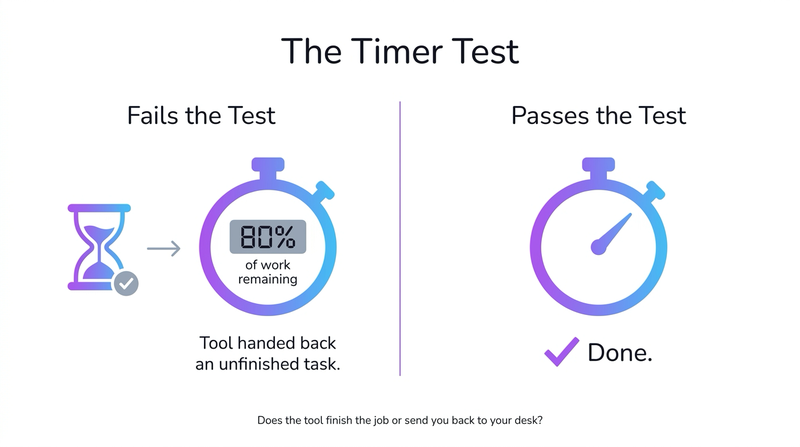
Noémia de Oliveira, AI & Process Automation Manager at OMR Reviews, calls it the Timer Test. Does the tool deliver a finished result? Does it send you back to your desk with 80% of the work still ahead of you?
Most AI tools fail it. One category passes almost every time.
That category is AI file management.
What the Data Says About AI File Management
OMR Reviews, one of Europe’s most respected software analyst platforms, just published their 2026 AI Software Guide. It maps the full landscape of AI tools and draws a sharp line between what delivers real business impact and what only works in demos.
Their list of what actually delivers today is notably unsexy: text generation, data analysis from messy spreadsheets, automating repetitive workflows. And then this:
“Also notable are agentic tools that independently handle complex tasks: writing code, managing files, conducting research. A genuine productivity leap.” (translated from German)
— Jens Polomski, AI & Marketing Expert, in the OMR 2026 AI Software Guide (p. 16)
File management. Right next to coding and research. Quietly, without fanfare.
Not because it’s impressive. Because it works.
Polomski makes the same point again later in the guide, and it’s worth sitting with:
“It’s not the spectacular applications that have the greatest impact. It’s the small, daily time savings that add up. Ten minutes here, twenty there. By the end of the week, that’s hours I can spend on work that actually matters.” (translated from German)
— Jens Polomski, OMR 2026 AI Software Guide (p. 29)
This is the compounding argument. The problem isn’t one bad afternoon hunting for a file. It’s ten minutes every day, every week, across every person on your team. And beneath the lost time sits something harder to measure: the downstream errors. The wrong version sent to a client because three files are all named “Contract_Final.pdf.” The invoice that never got processed because it landed in the wrong folder. The audit scramble because nobody can reconstruct what happened in Q3.
Disorganized files aren’t just a time problem. They’re a trust problem. Once you can’t rely on what’s in your drive, you stop relying on it.
Why AI File Management Passes the Timer Test
The reason most AI tools fail the Timer Test is that they operate in domains where human judgment actually matters. Writing still needs a voice. Strategy still needs context. Creative work still needs taste.
AI file management works differently because the task itself has a correct answer. A document either is an invoice or it isn’t. A file either belongs in the Q3/Client/Invoices folder or it doesn’t. No creative judgment required, no nuance to weigh.
Which means the automation can be real. Not “AI-assisted.”
This is also why naming matters more than most people realize. A filename isn’t just a label — it’s the entry point for everything that happens to a file afterwards. A consistently named file can be found by search. It can trigger an automation. It can be pulled into a report. It can survive a team member leaving.
A file called “scan_003.pdf” is effectively invisible. It exists, but it can’t be used. We call these dead assets: files that pile up in drives across every business, unreachable not because they’re gone, but because nobody can find them or trust what they contain.
Every business, from a solo freelancer to a 50-person agency, has the same underlying problem. Documents arrive fast, get named inconsistently, land in the wrong folder, and slowly stop being usable. Nobody talks about this at conferences. But anyone who’s spent 20 minutes hunting for a document they definitely saved somewhere feels it every day — and the real cost goes well beyond the search time. Not just in wasted time. In the low-level stress of knowing things are not where they should be.
The Rise of Operations AI
The OMR report makes an interesting prediction: the broad label of “AI agents” will soon fragment into specialized subcategories: Coding, Research, Sales, and Operations.
We think that’s right. And Operations is where the most underserved problems live.
Coding agents get GitHub integrations and VS Code plugins. Research agents get Perplexity and Notion AI. Sales agents get entire ecosystems purpose-built for their workflows.
Operations, the actual running of a business, the filing, the naming, the organizing, has mostly been left to humans doing manual, error-prone work. Or to generic automation tools that require you to build the workflows yourself before you can benefit from them.
That’s the gap Filently is built to close. Not with a complex DMS that requires migration, training, and a six-month rollout. With an invisible layer on top of the tools you already use (Google Drive today, more platforms soon) that handles the filing work automatically, so you never have to think about it.
Zero-touch, or it doesn't count. Filently needs no workflow to build.
Runs inside your existing Google Drive. No migration.
What “Zero-Touch” Actually Means
There’s a version of AI file management that still puts the work on you. Rules to configure. Templates to set up. Exceptions to manually handle. At the end of the day, you’ve moved the work, not eliminated it.
Zero-touch means something different. A file lands in your connected Google Drive. Filently identifies what it is, names it according to your convention, and stores it in the right folder. Done.
When this works consistently, something else becomes possible: the infrastructure for everything that comes after. Files named correctly can be searched semantically. Document types can trigger workflows. An accountant can pull every invoice from a specific client in seconds. An audit becomes a filtered search, not a three-day reconstruction project.
Naming isn’t the end goal. It’s the foundation for everything built on top of it.
We’re not there for every edge case yet, and we’re honest about that. But it’s the benchmark we hold ourselves to, and the number we track: what percentage of files are processed correctly without any user intervention. Right now, we’re at 90%+ on the document types our users process most.
That’s the Timer Test, applied to a product. Does it finish the job?
The DIY Question
One thread worth addressing directly: for well-defined, bounded problems, could you just build something yourself?
Yes, and it’s a reasonable instinct. A weekend with Zapier, an LLM API, and some Google Drive webhooks gets you something that works for your current files, named the way you currently name things.
What breaks it: new file types, evolving naming conventions, ambiguous documents, multi-language content, edge cases that weren’t in your test set. Production-quality AI file management means handling 20+ file formats, 20+ languages, GDPR-compliant EU processing, and a system that improves from corrections rather than breaking on them.
Getting from a working prototype to something you can trust every day is most of the work. We’ve mapped out every approach in detail — from native Google Drive features to n8n to full AI automation — if you want to see exactly where each option breaks down.
Where We Are
We’re live with Google Drive. Dropbox, OneDrive, and more are on the roadmap. We build in public, which means we share what’s working, what isn’t, and what we’re learning as we go.
The OMR report predicts a lot of today’s AI tools won’t exist in 12 months. The ones that will are solving specific, real problems completely. Not partially.
AI file management is one of those problems. It’s not the category that gets the keynote slot.
But it’s the one that saves you three hours every week, without you thinking about it. Those three hours, compounded across your team and across a year, are exactly what Polomski is describing. Not the spectacular win. The quiet, daily ones.
That’s the Timer Test. And it’s the only one that matters.
Filently is the AI filing layer for Google Drive. Files get identified, named, and organized automatically. No manual work, no migration, no new tools to learn. Try it free at filently.com