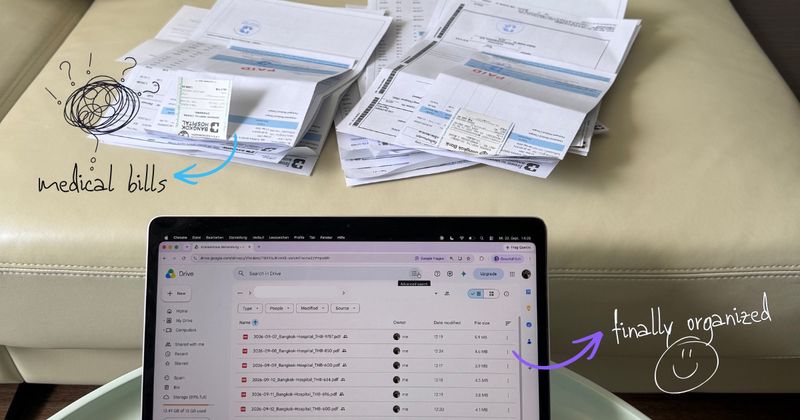
I’ve given up on a reimbursement before. Not because the amount was too small, but because I put off digitizing and sorting the bills for so long that at some point I just stopped.
Scan the receipts. Rename the files. Find the amounts and add them up. Get everything into the right folder. Then work out which ones I’d already submitted.
None of those steps is hard. That’s exactly why it’s so easy to lose money to them.
Then I ended up in hospital for a minor injury. Nothing dramatic, but it turned into eight invoices, several pages each. As the co-founder of a company that automates precisely this kind of paperwork, I had no excuse left. So here’s the workflow I use now, which is worth setting up whether or not you hand the last step to a tool.
Quick answer: Scan every bill into one folder the day you get it. Name each file YYYY-MM-DD_Provider_CUR-Amount — the same three fields the claim form will ask for. Give each submission its own folder so you always know what’s gone out. Keep the paper until the claim is paid.
Why the pile wins
A stack of medical bills isn’t a hard task. It’s a long chain of small ones, and the chain is the problem: every link is a place to stop.
The cost is real and it’s quiet. A reimbursement you never claim doesn’t show up anywhere as a loss. Nobody sends you a reminder that you left money with your insurer. It just never arrives, and you half-remember deciding it wasn’t worth the evening.
Volume makes it worse. One bill is a ten-minute job you’ll probably do. Eight bills across several pages each is an evening, and an evening is something you can postpone indefinitely.
Step 1: Scan into one folder, not into your camera roll
The habit that fixes most of this: get the bill off paper the day it’s in your hand, and put it somewhere deliberate.
You don’t need a scanning app. The Google Drive app has a scanner built in — open it, tap the +, choose Scan document, and hold the next page in front of the camera to add it to the same PDF. The full scanning setup takes four taps and no extra software.
The part that matters is the destination. Pick one staging folder and always scan into it. Not the camera roll, not whatever folder Drive happened to have open. A photo in your camera roll isn’t a document yet, and a PDF in a random folder is a file you’ll have to find twice.
Step 2: The filename is the claim form
This is where the work pays off, and it’s worth understanding why rather than just copying the pattern.
When you submit an insurance claim, the portal asks the same questions for every single receipt: who provided the service, what date, how much. If that information lives inside the PDF, each upload means opening the file, finding the total, typing it, closing the file. Eight bills, three fields, one open-and-close each.
If the information is in the filename, the upload form is a glance.
So the convention is:
YYYY-MM-DD_Provider_CUR-Amount
2026-09-23_Bangkok-Hospital_THB-2450.pdf
2026-09-15_AIS_THB-899.pdf
2026-08-31_Adobe_THB-529.pdf
Each part earns its place:
YYYY-MM-DD— the date on the document, not the date you scanned it. Written this way, files sort themselves chronologically in every file browser, forever. The general naming pattern is built on the same idea.Provider— the company, clinic, or organization that issued the bill. This is what you’ll search for.CUR-Amount— the final total due, with a three-letter currency code and no symbols or thousands separators. Symbols break filenames on some systems, and separators make the name ambiguous.
That last field is the one people leave out, and it saves the most time. You can total an entire claim by reading down the file list. You never open a document to answer “how much was that one.”
Why the currency code is not optional
If your bill and your policy are in different currencies, the code stops being a nicety. Insurers require the currency to be clearly marked on each receipt for a cross-border claim, because the figure they reimburse is a converted one and they have to show what it was converted from.
My invoices come in Thai baht. My claim doesn’t. Without THB in the name, every file is a small question I’d have to re-answer later. With it, the claim is arithmetic.
That covers more people than it sounds like: anyone who got sick on a trip, anyone living in one country and insured in another, anyone claiming on travel insurance.
Step 3: One folder per claim
Two folders, and this is the whole tracking system:
📁 Medical
   📁 Inbox              ← everything scanned, nothing submitted
   📁 Claims
      📁 2026-09-23 - Hospital - 8 invoices
      📁 2026-06-11 - Physio
When a claim goes out, move its bills into a folder named for the submission date. Anything still sitting in Inbox hasn’t been claimed yet.
That’s the whole thing, and it answers the question that makes people avoid the task in the first place: have I already submitted this one? Without an answer, you either submit twice or you don’t submit at all.
The bills are the easy part. The renaming is why you stop. Filently picks up each document that lands in your Google Drive, names it to your convention, and files it where it belongs.
First 25 documents free. 2-minute setup. No credit card needed.
What the claim actually looks like where you are
Whether any of this applies to you comes down to one question: do you ever hold the bill yourself? The answer varies more than you would expect — for some people it’s every routine appointment, for others it’s once in a decade.
Switzerland. The most routine version of this anywhere. Under tiers garant, the normal arrangement for outpatient care, the practice bills you directly, you pay it, and you submit the invoice to your insurer, who reimburses what is covered after your deductible and co-payment. No edge case, no foreign-treatment exception: that is how an ordinary doctor’s visit works. Submission runs through the insurer’s app or portal, which makes the upload form and its three fields a monthly companion rather than an annual surprise.
Germany. Everything depends on which side of the system you are on. With statutory insurance (GKV) you show a card and never see a bill, because the practice settles directly. With private insurance (PKV) the logic inverts: you get the invoice, you pay it, and you submit it to be reimbursed by app, portal, or post, with the prescription and any referral attached. Civil servants then send the same stack a second time to Beihilfe — the one case where naming your files properly stops being a convenience.
United States. Here it’s a situation rather than a system: out-of-network care, where you pay the provider and submit a claim to your insurer afterwards. What they need is an itemized bill or a superbill showing the provider, the date of service, a description of each service, and the amount. A total with no breakdown gets rejected. The same discipline serves HSA and FSA reimbursement, where you might claim an expense years later and need the receipt to still make sense when you do.
Canada. Your provincial plan covers the doctor and the hospital, so the bills you pay and claim are extended health: dental, vision, physiotherapy, psychology, prescriptions. You submit through your insurer’s app, and the receipt has to show what kind of service it was and the amount, with prescriptions needing the drug identification number. Out-of-country claims are where the currency field comes in.
Australia. Medicare is often settled at the practice, so this comes up only when it is not. Then you pay and claim the rebate yourself by uploading the itemized invoice through the Express Plus Medicare app, with the rebate landing in a few business days. Private extras work the same way when they are not swiped on the spot.
United Kingdom. The NHS generates no bill, so the domestic version of this problem barely exists. That is why the UK cases are all edges: private medical insurance, where you send invoices and receipts for treatment you have already paid for; NHS refund forms, which want copies of your receipts; and travel insurance, where you are back to a foreign hospital, a foreign currency, and a stack of paper.
Insured internationally. And then there is the category that never gets a break. If you hold an expat or international policy, you are in the pay-first group permanently, whatever country you happen to be standing in. That is my own situation, and it comes with a difference worth knowing: these policies are often handled by a named agent rather than a claims portal, and the submission is an email. Which changes what you hand over.
Portal or agent: it changes what you send
The route your insurer uses decides how the folder gets used, so it’s worth knowing before you build one.
A portal or app takes files one at a time. You upload, then type the provider, the date, and the amount for each. Nothing you do with folders reaches the insurer, but the filename does all the work, because every field the form asks for is already sitting in front of you.
An agent by email takes whatever you send. Here the folder itself is the deliverable: I shared my Google Drive folder with my insurance agent, and that was the entire submission. Eight invoices, named consistently, in one place, with nothing to attach and nothing to zip.
The same folder serves both. Only in the second case does the tidiness travel with it, which is a good reason not to count on a shared link until you know which kind of insurer you have.
Keep the paper until the money lands
Scans are what you submit. Originals are what you keep, for now.
Insurers accept legible scans as a matter of course, and then reserve the right to ask for the original to verify a claim — count on roughly 12 months. If the expense also touches your tax return, the clock runs longer: three years for ordinary records, and seven is the usual advice for HSA substantiation, since the reimbursement can come long after the expense.
So the rule is simple. Shoebox the paper, chronologically, until each claim is settled and paid. Then let it go, because the scan is the copy that’ll still be findable in five years.
Automating the part where people stop
Everything above works by hand. The reason I actually do it now is that the renaming step happens without me.
In my case: I scan with the Google Drive app straight into a watched folder, and Filently takes it from there. It identifies what each document is, names it to my convention, and moves it to the right folder. For medical bills I wanted the date, the hospital, and the amount in the name, so that’s what I told it:
For invoices and bills, rename the file using this convention:
YYYY-MM-DD_[Vendor]_[CUR]-[Total Amount]. Use the invoice date shown on the document. Use the name of the company, provider, or organization that issued the invoice. Use the final total amount due, without currency symbols or thousands separators.
That’s the whole configuration. Eight invoices went in as camera scans and came out named the way I’d asked, in the folder I wanted them in. Everything stays in my own Google Drive — nothing moves to another system, and the folder structure is the one I already had.
What it won’t do is submit the claim. No tool does that for you; the portal is still the portal. What it removes is the chain of small steps in front of the claim, which in my experience is the part that decides whether the claim happens at all.
If you’ve got a backlog of bills already sitting in Drive under names like Scan_0043.pdf, that’s worth clearing in one pass rather than one file at a time, and then letting new ones land in place on their own.
Common Questions About Organizing Medical Bills for a Claim
What documents do I need to submit a medical insurance claim?
For a claim you pay up front and get reimbursed for, insurers want an itemized bill or receipt for every service, not a card statement and not a summary. Each one has to show who provided the care, the date, a description of what was done, and the amount you paid. Most insurers also want their own claim form, and some want a referral letter. A total with no breakdown is the single most common reason a claim comes back.How should I name medical bill files?
UseYYYY-MM-DD_Provider_CUR-Amount, so a hospital invoice becomes 2026-09-23_Bangkok-Hospital_THB-2450.pdf. The date first makes files sort themselves chronologically, the provider makes them searchable, and the amount lets you total a claim straight from the file list. Those are the same three fields the claim form asks for, which is the whole point.Should the currency go in the filename?
Yes, whenever the bill is in a different currency from the one your policy pays out in. Insurers require the currency to be clearly marked on each receipt for a cross-border claim, and it’s the field people most often have to go back and check. A three-letter code in the filename —THB, USD, CAD — costs nothing and settles the question for good.Will my insurer accept a scan or a photo instead of the original bill?
In practice yes. Claims are submitted through apps and portals now, and a legible scan is what they expect. But accepting a scan doesn’t release you from the original: insurers can ask for the paper copy to verify a claim, typically for about 12 months after submission. Scan it, submit the scan, keep the paper until the claim is settled and paid.How long do I need to keep medical bills?
Keep them roughly a year for the insurer, who may ask you to verify a claim in that window. If the expense also touches your taxes — a medical deduction, or a US HSA or FSA reimbursement you might take years later — the horizon is longer: three years for ordinary tax records, and seven is the common advice for HSA substantiation, since you can reimburse yourself long after the expense.Can I share a Google Drive folder with my insurance company?
It depends on how your insurer takes claims. If they use a portal or an app, no — documents go in one at a time through their form, and a shared link never enters their claims system. If your claims go to a named agent by email, which is common with expat and international policies, then yes: sharing the folder can be the whole submission, with nothing to attach or zip. Either way the folder earns its place, because it’s what makes the uploads fast and what you go back to when they ask for one specific receipt six months later.Do I have to pay medical bills myself in Switzerland or Germany?
In Switzerland, usually yes. Under tiers garant, the standard arrangement for outpatient care, the practice bills you, you pay, and you submit the invoice to your insurer for reimbursement after your deductible and co-payment. In Germany it depends on your cover: with statutory insurance (GKV) the practice settles directly and you never see a bill, while private insurance (PKV) works the other way round — you pay the invoice and submit it to be reimbursed. Civil servants submit the same documents twice, once to the insurer and once to Beihilfe.How do I track which bills I have already submitted?
Give each claim its own folder, named for the date you submitted it, and move the bills into it when they go out. Anything still sitting in the staging folder hasn’t been submitted yet. It sounds trivial, and it’s the part people skip, which is why they end up either claiming the same bill twice or quietly never claiming one at all.What if I live in one country and my insurer is in another?
The workflow is the same, with two additions. Put the currency code in every filename, because the amount your insurer reimburses is a converted figure and you’ll be asked to back up the original. And expect to be asked for a translation or an itemized breakdown more often than a domestic claimant would be, so keep the fullest version of every document rather than the summary page.Sometimes the task isn’t the problem. It’s all the small steps you have to get through before you can start.
Try Filently free → First 25 documents free. No credit card needed.