Google Drive gives you the tools.
Filently adds the smart filing layer.
Google now offers tools to organize existing files and automate filing workflows. Filently takes a different approach: it learns your Drive and handles filing and naming for you.
A factual comparison · Updated October 2026
Google can organize and automate your files.
But filing a document means more than moving it to a folder.
That's where Filently comes in.
Google Drive now gives you two ways to organize.
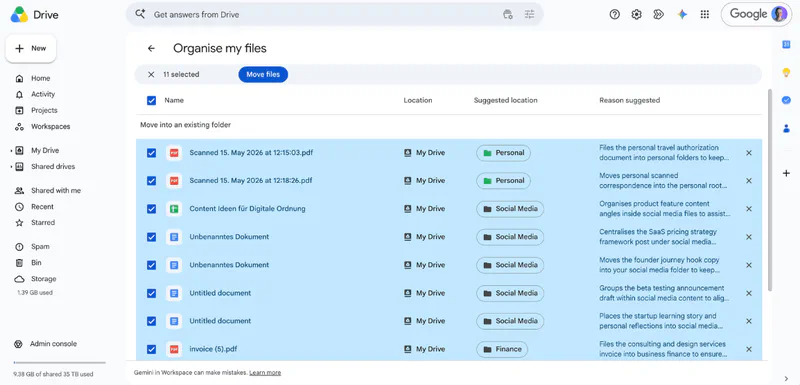
Organize my files
Clean up what's already there.
Gemini analyzes loose files in My Drive and suggests moving them into existing or new folders. You review each suggestion and approve it.
Good for: cleaning up loose files in My Drive.
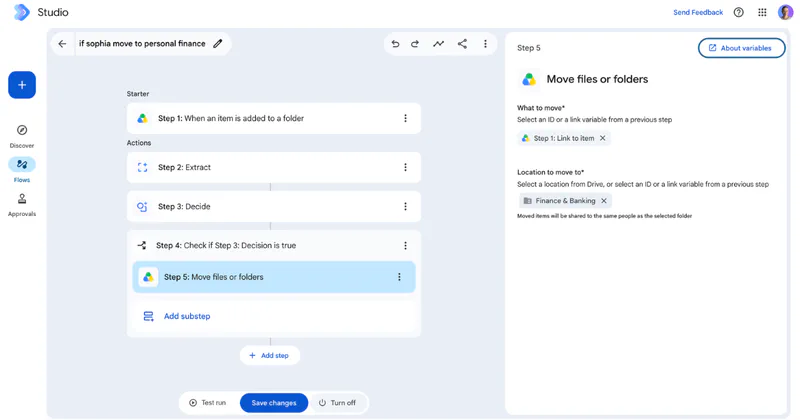
Workspace Studio
Automate what happens next.
You build a flow that starts when something happens, analyzes the information and takes actions in Workspace — including moving Drive files.
Good for: building custom automations.
So Google can absolutely help organize your files.
But there's still work to do.
Google can help organize your Drive. But you still have to build or manage the filing system around it.
And then there's naming
What should the file be called?
Neither approach automatically turns IMG_8472.pdf into a useful filename based on what's inside.
Invoice · ACME · 14 Sep 2026 · #4821
?A filename that says all of that
Still your job: naming files consistently.
Filently takes care of all three.
It understands the document, names it, and files it based on the structure already in your Drive.
What if you didn't have to build the filing system?
Filently learns how your Drive is already organized and uses that structure to name and file your documents.

What actually happens to your files?
| Capability | Filently | |
|---|---|---|
| Understand documents | ✓ | ✓ |
| Organize existing files | ✓ | ✓ |
| Move files | ✓ | ✓ |
| Handle new documents automatically | With workflows | ✓ |
| Rename documents as part of filing | — | ✓ |
| Keep files consistently named | Up to each user | Named to your filing system |
| Learn your existing filing structure | Depends on setup | ✓ |
| Works without filing rules | Rules required | ✓ |
| Continuous automatic filing | With workflows | ✓ |
Google = tools and building blocks · Filently = a dedicated filing layer
Want the naming step, too? Filently names every new document and files it into the Google Drive folders you already have.
First 25 documents free. No credit card needed.
Filing isn't finished when the file reaches the right folder.
A file can be in the right folder and still be impossible to recognize.
Our Workspace Studio test · filed by Google
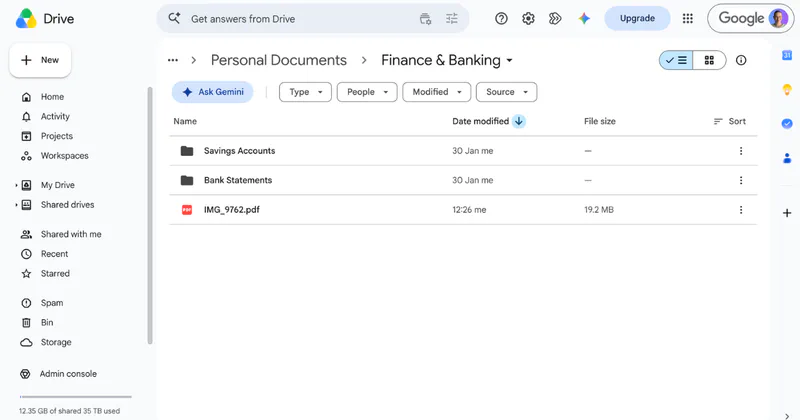
Perfectly filed. Completely unfindable.
The flow read the receipt correctly and moved it into the right folder. The file is still called IMG_9762.pdf.
The same document · filed by Filently
IMG_9762.pdf
2026-09-14_ACME_Invoice_4821.pdf
Findable in six months.
Filently turns what it understands into a filename and a destination — renamed in place, not duplicated.
Your Drive already has a filing system. Filently learns it.
Maybe it's carefully structured. Maybe it grew over years. Maybe only one person knows where everything belongs.
Filently looks at your folders, filenames and documents to understand how your Drive is organized — and files new documents the same way.
Your existing Drive becomes the specification.
No migration · No new folder structure · Nothing to teach it
People already let Filently handle their filing.
“It makes a time-consuming, repetitive task much more efficient and easier.”
 Raeleen M.Owner, small business — via G2
“The automatic folder structure and file sorting work surprisingly well.”
 Andrea P.PhD student — via G2
We tested Organize my files and Workspace Studio so you don't have to.
Organize my files
What Gemini's suggestions actually do — and the four limits worth knowing.
Workspace Studio
We built the filing flow Google's new Move step makes possible. It worked — and left the file called IMG_9762.pdf.
Which one fits the way you work?
You might prefer Google if
“I want to build and maintain it myself.”
You want custom Workspace workflows, control over the logic, and automation across more than filing — and you can live with original filenames.
You might prefer Filently if
“I want it to just work.”
You want documents named and filed automatically, using the structure you already have — across My Drive and Shared Drives, in any language.
What does it cost?
Included with eligible plans
Organize my files and Workspace Studio come with eligible Google Workspace and Google AI plans. The build and upkeep time is yours.
Filently
First 25 documents free
Then a paid plan for continuous filing. No credit card to start, cancel anytime — and your files stay in your Drive.
You're paying for a dedicated filing layer, not another place to store your files.
Files stay in your Drive
Renamed in place, not duplicated. Which permissions Filently asks for, and why
Swiss-made, EU-processed
Documents processed in the EU.
CASA Tier 2 certified
14 security categories reviewed.
Never used to train AI
Your documents stay yours.
What a Google user asks.
Google Drive AI or Filently
Which organizes Google Drive automatically, Google or Filently?+
Both can organize a Google Drive, Google only in parts: Gemini's Organize my files suggests a folder for each loose file in My Drive, which you then approve, and Workspace Studio files documents through flows you build yourself. Filently names and files each new document as it arrives. Neither Google tool gives a file a new name.
Which renames files by content, Google Drive or Filently?+
Filently renames files by their content; Google Drive doesn't. You can rename a file yourself, and a Workspace Studio flow can apply a name you define, but Drive doesn't work out what a document is and give it a consistent, content-based name every time a new one arrives.
Google and Filently compared
What is the difference between Gemini's file organization and Filently?+
Gemini works in passes: you ask it to organize, then review and approve its suggestions. Filently works continuously. A document arrives, Filently identifies what it is, names it and files it. Gemini is good for clearing a backlog of loose files; at the time of writing it is limited to Drive on the web, in English. Filently is for keeping the Drive tidy afterwards. We walked through Organize my files in our hands-on test.
What is the difference between Google Workspace Studio and Filently?+
Workspace Studio does what you tell it: you define the trigger, the conditions and the destination for every case, one flow per case. Filently learns from the folders and filenames already in your Drive, so there are no rules to write and nothing to rebuild when your structure changes. We built a Studio flow to see what it takes.
Is Filently part of Google Drive?+
Filently is not part of Google Drive: it is a Google Workspace Marketplace app that connects to the Drive you already use. Documents stay in your own Drive and are renamed and filed in place. Filently is CASA Tier 2 assessed by a Google-authorized lab.
What Filently does
Can Filently rename and file documents automatically?+
Filently renames and files documents automatically: it identifies what a document is, builds a filename that follows your convention, and files it into the matching folder. You can review what it proposes before anything moves, or let it run on its own.
Can Filently use my existing Google Drive folder structure?+
Filently starts from your existing Google Drive folder structure: it looks at your folders and the filenames already in them to work out how you file, then handles new documents the same way. No migration, and no new structure to learn.
Does Filently work with Google Shared Drives?+
Filently works with My Drive and with Shared Drives, so team documents follow the same naming and filing conventions as personal ones.
What can't Filently do?+
Filently can't name images without text, like holiday photos, because there is no document content to name them by, and it doesn't work with files outside Google Drive.
Does Filently have a team plan?+
Filently has no team plan yet: each plan connects one Google account, which can file into My Drive and into the Shared Drives that account can access.
Let your Drive take care of the filing.
Connect Google Drive and let Filently handle the repetitive work of naming and filing your documents.
No rules. No workflows. No migration.
No credit card · Cancel anytime · Files stay in your Drive